
Reminders and widgets
Reminders for each part of your day,and a heads-up before you run out.
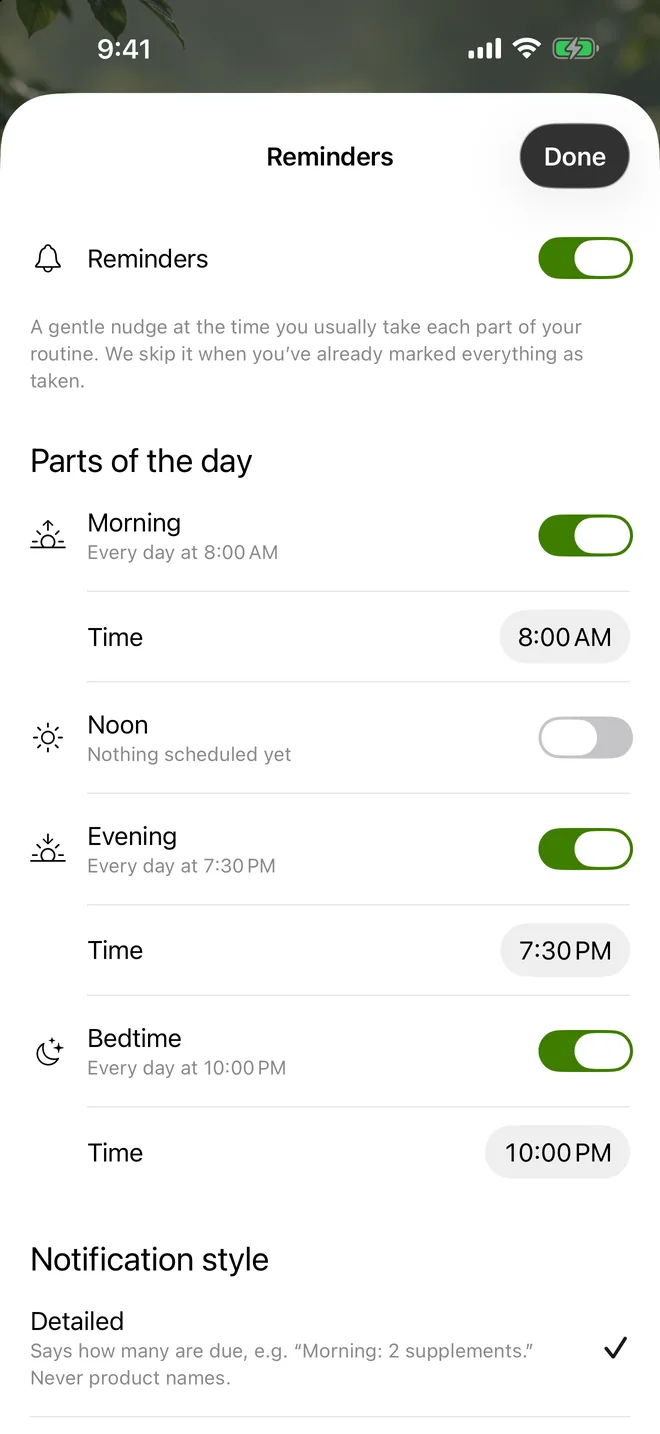
Suppin reminds you at the times you choose for morning, noon, evening and bedtime, warns before a bottle runs out, and helps you fill a pillbox.
Educational guidance, not medical advice.
How it works
- 1
Set your times
Pick a reminder time for each part of the day your routine uses.
- 2
Choose what it shows
Detailed shows how many are due; Simple shows no names or counts.
- 3
Log from anywhere
Mark doses taken in the app, from the notification, or check a widget.
- 4
Keep stock
Enter how many are left and get a heads-up before a bottle runs out.
Reminders for each part of the day
Your routine is split into parts of the day: morning, noon, evening and bedtime. Each one can have its own reminder at the time you usually take it. A reminder is skipped when you've already marked everything in that part as taken, so you aren't nudged for something you've done. From the notification you can mark it as taken or open the list. Most reminders are scheduled on your iPhone itself, and you can turn any of them off.
Choose what your lock screen shows
Supplements are personal, so you decide how much a reminder says. “Detailed” tells you how many are due, for example “Morning: 2 supplements”, and never shows product names. “Simple” shows no supplement names or counts at all. Either way, the list of what to take stays inside the app, which matters if other people see your phone. With “Simple”, refill alerts don't name the product either. You can change the style at any time in Reminders.
Supply counts and refill alerts
Enter how many capsules, tablets or servings are left in each bottle on your shelf. The count goes down as you mark doses taken, and the app works out roughly how many days each product will last at your routine's pace. About five days before a product runs out, you get one heads-up. It resets after you restock, so a refill doesn't bring a stream of alerts. You can switch refill alerts off in Settings.
Guided pillbox filling
If you use a pill organiser, Suppin walks you through filling it bottle by bottle: what goes into which compartment for the week ahead. Powders, liquids and anything that stays in its pack are listed as “take at the time”. An optional pillbox refill reminder tells you a day before the box runs out, and the app shows which day the next refill is due.
Home-screen and lock-screen widgets
The “Today's schedule” widget shows what to take next and how much of today you've already taken. It comes in small, medium and large sizes for the home screen, and circular, rectangular and inline sizes for the lock screen. Inside the app, Home and the Schedule in My Stack show today by part of day, with rings for the week and a button to log a whole part at once.
Questions about reminders and widgets
You set a time for each part of the day your routine uses: morning, noon, evening or bedtime. The reminder is skipped if everything in that part is already marked as taken. From the notification you can mark it as taken or open the list, and you can change times or turn reminders off at any time.
Yes. Intake reminders never show product names. “Detailed” shows only how many are due, such as “Morning: 2 supplements”, and “Simple” shows no names or counts at all. You choose the style under Notification style in Reminders and can change it whenever you like.
Enter how many are left on your shelf. The count drops as you mark doses taken, and the app shows roughly how many days each product will last. About five days before one runs out you get a single heads-up, which resets after you restock.
Yes. A guided screen tells you, bottle by bottle, what goes into each compartment for the week. Powders and liquids are listed separately to take at the time, and an optional reminder tells you a day before the box runs out.
Yes. The “Today's schedule” widget shows what to take next and how much of today you've taken. It comes in small, medium and large sizes for the home screen, and circular, rectangular and inline sizes for the lock screen. The schedule refreshes whenever you open the app.
More answers on the FAQ page.